
CRM · 19 min read
GoHighLevel for home services: step-by-step CRM setup guide
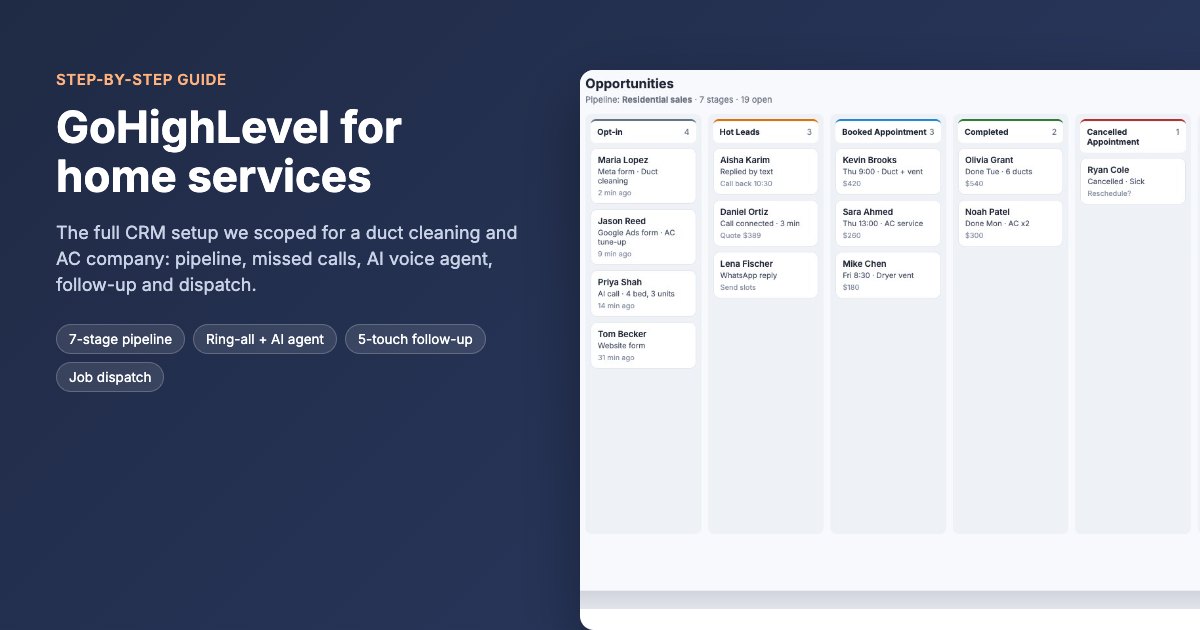
GoHighLevel for home services, set up step by step for a duct cleaning and AC company that was leaving Zoho: a 7-stage pipeline that moves itself, every lead source wired in, no missed calls thanks to ring-all plus an AI voice agent, a 5-touch follow-up counter, job dispatch and one dashboard. Twelve steps, with screens.
Updated 12 November 2026 · GoDesign build team
The short version
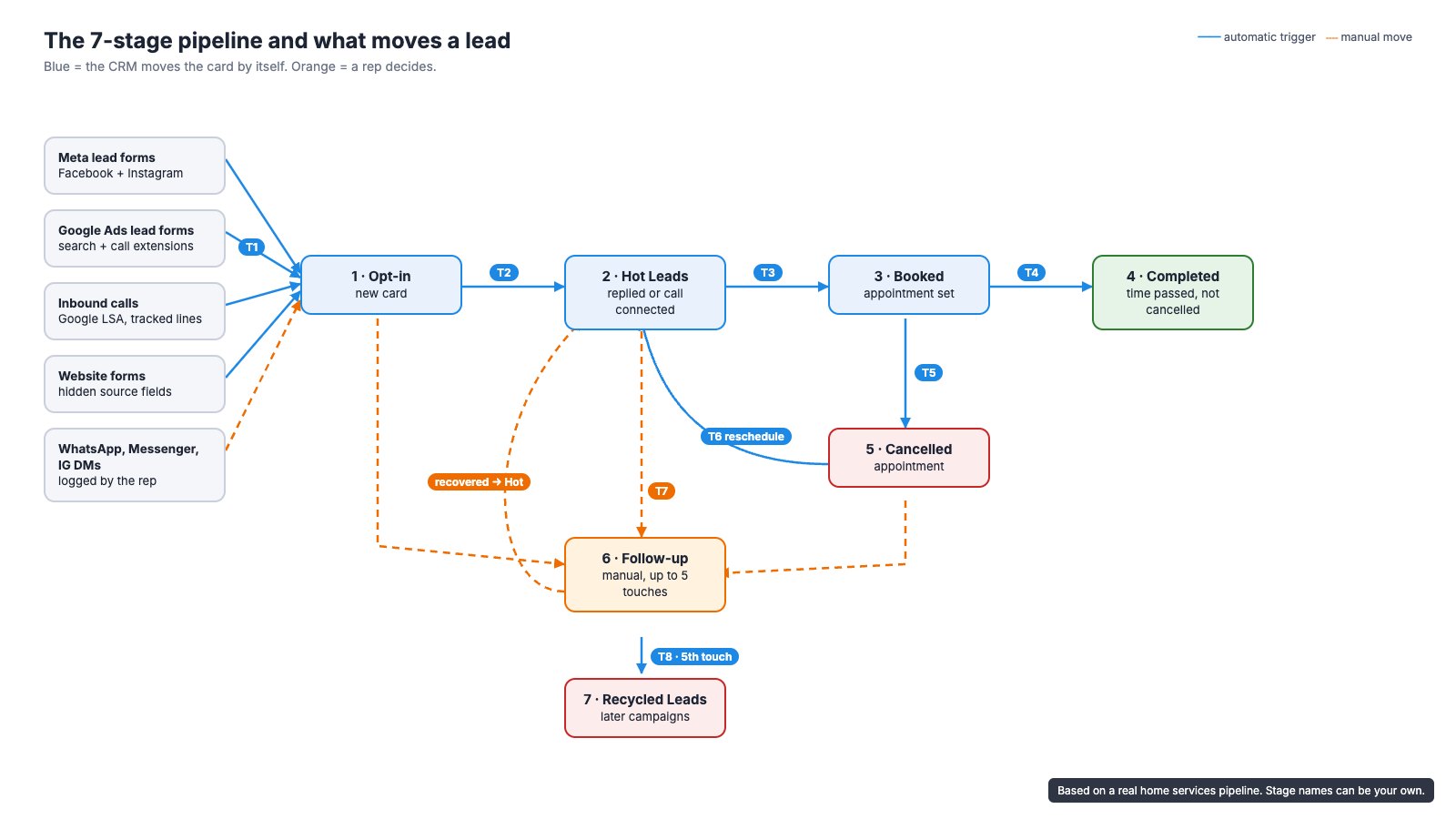
- Design the pipeline around what moves a lead, not around job titles: 7 stages, 8 triggers, and only 1 of them left to a rep's judgement.
- Every call rings every rep at once; after 10 seconds an AI voice agent answers, asks five questions and puts a card in Opt-in with a 5-minute callback task.
- A number field counts follow-up touches. At 5 touches with no reply the lead moves to Recycled Leads instead of rotting in someone's list.
- A build at this scope is 43 to 48 hours of work over 4 to 5 weeks. Most delays come from phone number approval, Meta verification, messy CRM data and missing admin access.
GoHighLevel for home services can run a company's whole sales process, from the first call or form to a completed job, if you build the setup in this order: access, pipeline, fields, lead sources, stage automations, follow-up, phones, AI voice agent, inbox, data migration, dispatch, reporting, then testing. This guide walks through each step with the exact triggers and fields we specified for a real duct cleaning and AC company. Every screen below is an illustration with made-up names, but the settings are the ones we specified.
The company runs AC servicing and duct cleaning crews, plus maintenance, cleaning and pest control, in the US and the UAE. It was leaving Zoho CRM because per-user pricing kept climbing as the team grew. On a slow day one branch gets 20 to 25 leads, from 8 to 10 ad campaigns running at once across Meta and Google, plus calls, WhatsApp and Instagram messages. Leads were getting lost between those channels. They asked us to move everything into one GoHighLevel account and make it work without reps updating cards by hand.
What problems does GoHighLevel solve for a home services company?
Almost never a missing feature in the CRM itself. The owner's list is a list of things that fall through the gaps between people and channels. This one, from the client's own brief, is typical:
- Missed calls, and nobody knows which ones were returned.
- Leads that arrive on WhatsApp or a rep's personal phone and never reach the CRM.
- Slow first replies, so the customer books whoever answered first.
- Quotes sent and never followed up; discounts given without anyone approving them.
- Sales promising a scope that operations finds out about on site.
- Technicians closing jobs without photos or a report, and extra work found on site going unbilled.
- Maintenance contract renewals and planned visits missed because they lived in a spreadsheet.
- Managers chasing people to find out what is happening, and staff saying 'I forgot'.
The test the client set for the new system was simple: at any moment, management should be able to see what business is coming in, who owns it, what is due next, where each customer or job is stuck, and who has to act if something is late. Every step below exists to answer one of those five questions without anyone asking.
What does a finished GoHighLevel setup do?
- Every lead lands in one place. Meta and Google lead forms, calls, website forms, WhatsApp, Messenger and Instagram messages all create or update a card, with the source recorded.
- No call goes unanswered. All sales reps ring at once; if nobody picks up in 10 seconds, an AI voice agent answers, qualifies the caller and alerts the team.
- The pipeline moves itself. Replies, bookings, cancellations, reschedules and passed appointment times move cards between stages.
- Follow-up has an end. Quiet leads get up to 5 logged touches, then go to a recycled list for later campaigns.
- One history per customer: calls with recordings, texts, WhatsApp and email in one thread.
- Won work becomes a job with a technician, a date and a status, and the dashboard shows where everything stands.
Before you start: what access and decisions do you need?
Get admin access first, including the Automations section. On our first call the client's own login could not see Automations, Funnels or the AI tools, because the user had not been given admin rights. Nothing can be quoted or built until that is fixed, so ask for it before the kick-off call.
- Admin access to the GoHighLevel sub-account, with Automations, AI agents and phone settings visible.
- A full export of contacts and deals from the old CRM, or admin access so you can export it yourself.
- Admin access to Meta Business Manager: the Facebook page, the Instagram account and the lead forms.
- Access to the Google Ads account, and the Google Local Services Ads account if they use it.
- The WhatsApp Business number and the phone it currently runs on.
- DNS access for the website domain, to set up the email sending domain.
- The list of reps who should receive calls, and their working hours.
- How jobs are dispatched today: what a job needs to contain and how it is tracked.
Then write down the decisions that change the build. We list ours later under 'Questions to settle before you build'. Agree them in writing before you start; changing a stage rule after the automations exist costs more than deciding it on day one.
Step 1: How do you set up users, permissions and pipeline stages?
Start with roles, then the pipeline. Give reps access to contacts, conversations and opportunities; give coordinators calendars and jobs; keep settings and billing with one admin. Then create one opportunity pipeline with these stages, in this order:
| Stage | What it means | How a card gets here |
|---|---|---|
| 1. Opt-in | A new lead nobody has spoken to yet | Automatically from forms and calls (T1); manually for chats a rep logs |
| 2. Hot Leads | The lead replied or a call connected | Automatically when they reply or a call is answered (T2) |
| 3. Booked Appointment | A visit or service slot is booked | Automatically when a rep books on the card (T3) |
| 4. Completed | The appointment time passed and it was not cancelled | Automatically after the slot (T4) |
| 5. Cancelled Appointment | The customer cancelled | Automatically on cancellation (T5) |
| 6. Manual Follow-up | Went quiet; a rep is chasing it | A rep's decision (T7) |
| 7. Recycled Leads | Five touches, no reply | Automatically on the fifth touch (T8) |
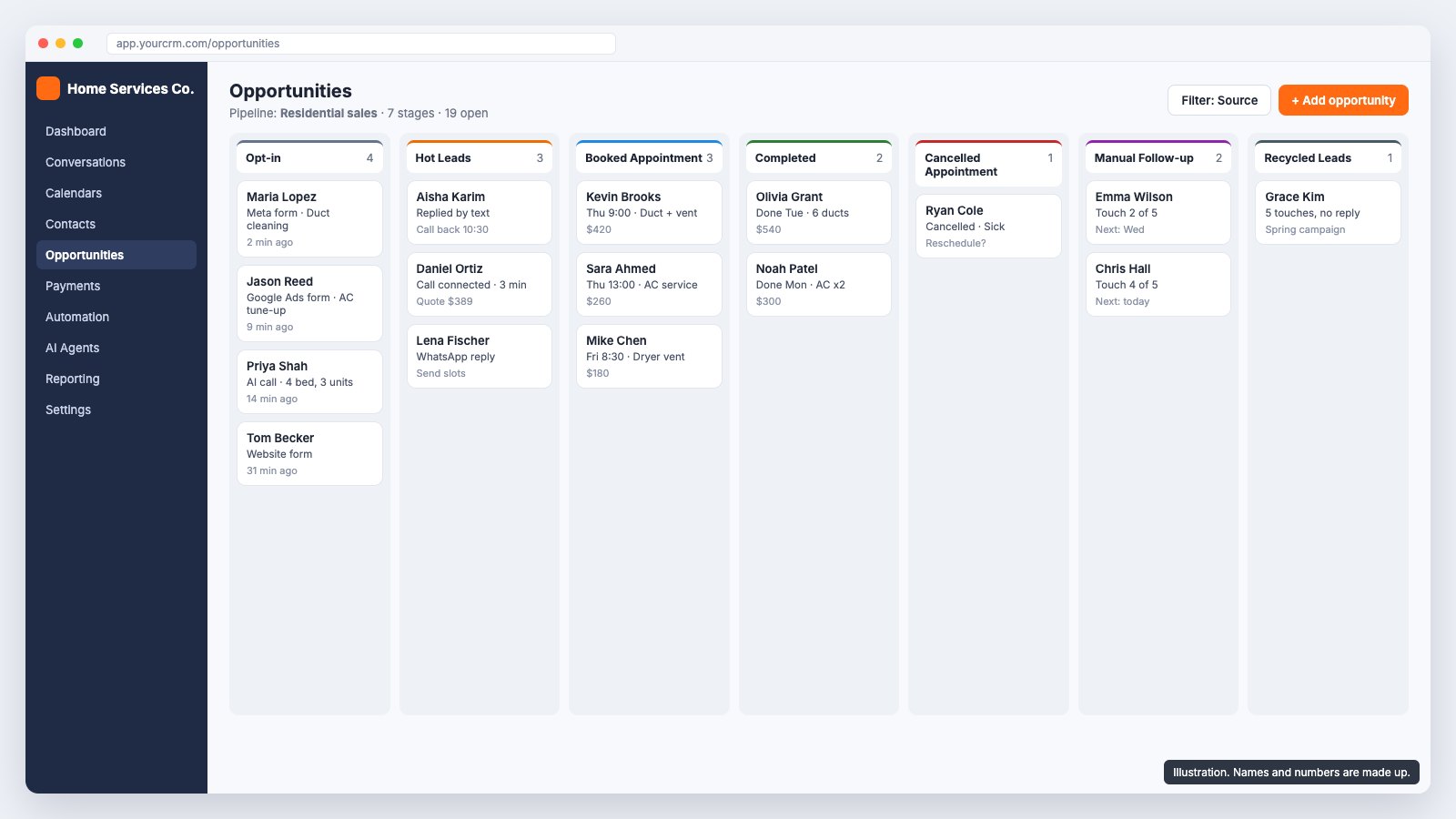
- In Settings, create the users and set each role's permissions. Turn off 'see all opportunities' for reps if you want each rep to work only their own.
- In Opportunities, create a pipeline (we called it 'Residential sales') and add the seven stages above, with the exact names you will use in workflows.
- Create a booking calendar for site visits and service slots, with the reps or teams who take bookings, travel buffers and working hours.
- If you run very different services (AC servicing, pest control, renovation), plan one pipeline per business line, but build and test this one first.
Step 2: Which custom fields does an HVAC or duct cleaning pipeline need?
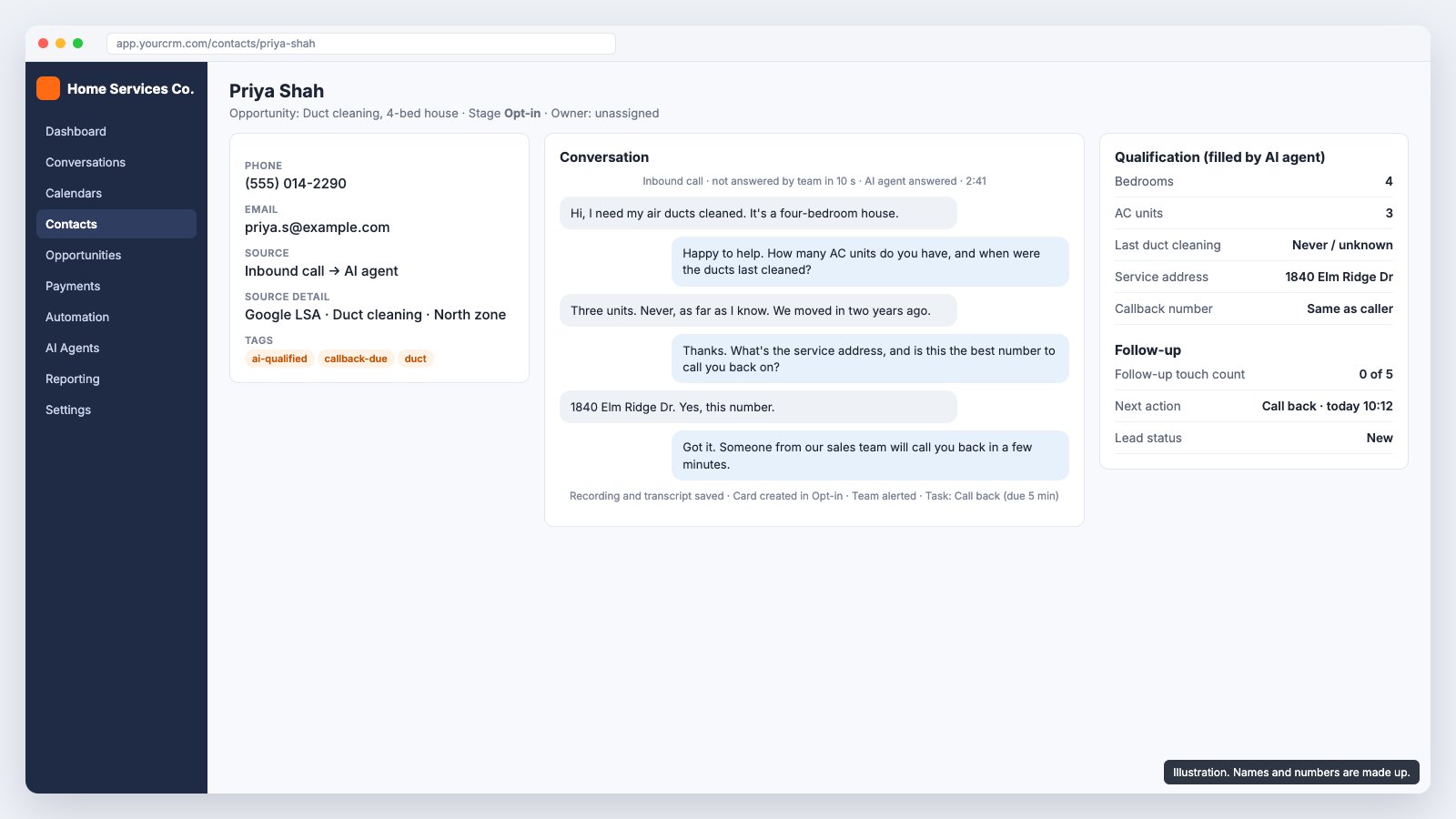
Only the fields someone will use to decide or act. We added three groups: qualification fields the AI agent and reps fill in, source fields filled automatically, and control fields that keep the follow-up honest.
| Field | Type | Why it is there |
|---|---|---|
| Bedrooms | Number | Sizes a duct cleaning quote |
| AC units | Number | Sizes the job and flags maintenance contract potential |
| Last duct cleaning | Dropdown (never/unknown, under 1 year, 1 to 3 years, 3+ years) | Urgency and upsell |
| Service address | Text | Routing and travel time |
| Source detail | Text | Platform, service, area and campaign, e.g. Google LSA, Duct cleaning, North zone |
| Follow-up touch count | Number | Drives the move to Recycled Leads (T8) |
| Next action and date | Text + date | No open card without a next step |
| Lost reason | Dropdown | So 'lost' teaches you something |
Use dropdowns wherever the answer is one of a few options. Free-text fields cannot be filtered or reported on, and a status that every rep spells differently is worse than no status.
Step 3: How do you connect Facebook, Google Ads and WhatsApp leads?
This is trigger T1: a new lead from any form creates a contact and a card in Opt-in, with the source filled in. Wire the sources one at a time and test each with a real submission before moving on.
| Source | How it reaches GoHighLevel | Notes |
|---|---|---|
| Meta lead forms (Facebook and Instagram) | Connect the page in Integrations; a workflow triggered by 'Facebook lead form submitted' creates the opportunity | Map every form question to a field. Name forms by service so the source detail is useful. |
| Google Ads lead forms | Google lead form webhook into a GoHighLevel workflow | Pass the campaign name into Source detail. |
| Inbound calls (Google Local Services Ads, call extensions, tracked numbers) | Calls to a GoHighLevel number create or match the contact by phone | Use one tracked number per source if you want calls split by channel. Check whether your Local Services Ads calls forward to the GoHighLevel number. |
| Website forms | GoHighLevel form embed or a form posting to a webhook | Add hidden fields for UTM source and campaign. |
| WhatsApp Business | Connect the existing number through GoHighLevel's WhatsApp integration | Meta's business verification comes first and can take time. Start it in week 1. |
| Messenger and Instagram DMs | Facebook and Instagram channels in Conversations | The client's reps logged these by hand at first; a workflow on 'customer replied' can create the card instead. |
One source you cannot connect: Google Business Profile chat. Google shut it down in July 2024. Calls from the Business Profile listing still reach your number, so they are covered by the phone setup in step 6.
Record the source as a chain, not one word. 'Facebook' tells you nothing when 10 campaigns are live. 'Meta, duct cleaning, north zone, spring offer' tells you which campaign paid for the booked job.
Step 4: How do you build GoHighLevel workflows that move pipeline stages?
Write the trigger list before you open the workflow builder. Ours was short enough to put in the proposal, and it became the test plan too:
| ID | Trigger | Action | Automatic? |
|---|---|---|---|
| T1 | New Meta or Google Ads form submission | Create contact and card in Opt-in | Yes |
| T2 | Lead replies, or a call connects | Opt-in to Hot Leads | Yes |
| T3 | Rep books an appointment on the card | Hot Leads to Booked Appointment | Yes |
| T4 | Appointment time passes, not cancelled or rescheduled | Booked to Completed | Yes |
| T5 | Appointment cancelled | Booked to Cancelled Appointment | Yes |
| T6 | Cancelled appointment rescheduled | Cancelled back to Hot Leads | Yes |
| T7 | Rep decides the lead has gone quiet | Opt-in, Hot Leads or Cancelled to Manual Follow-up; back to Hot Leads if recovered | No, a rep's call |
| T8 | Follow-up touch count reaches 5 without a reply | Manual Follow-up to Recycled Leads | Yes |
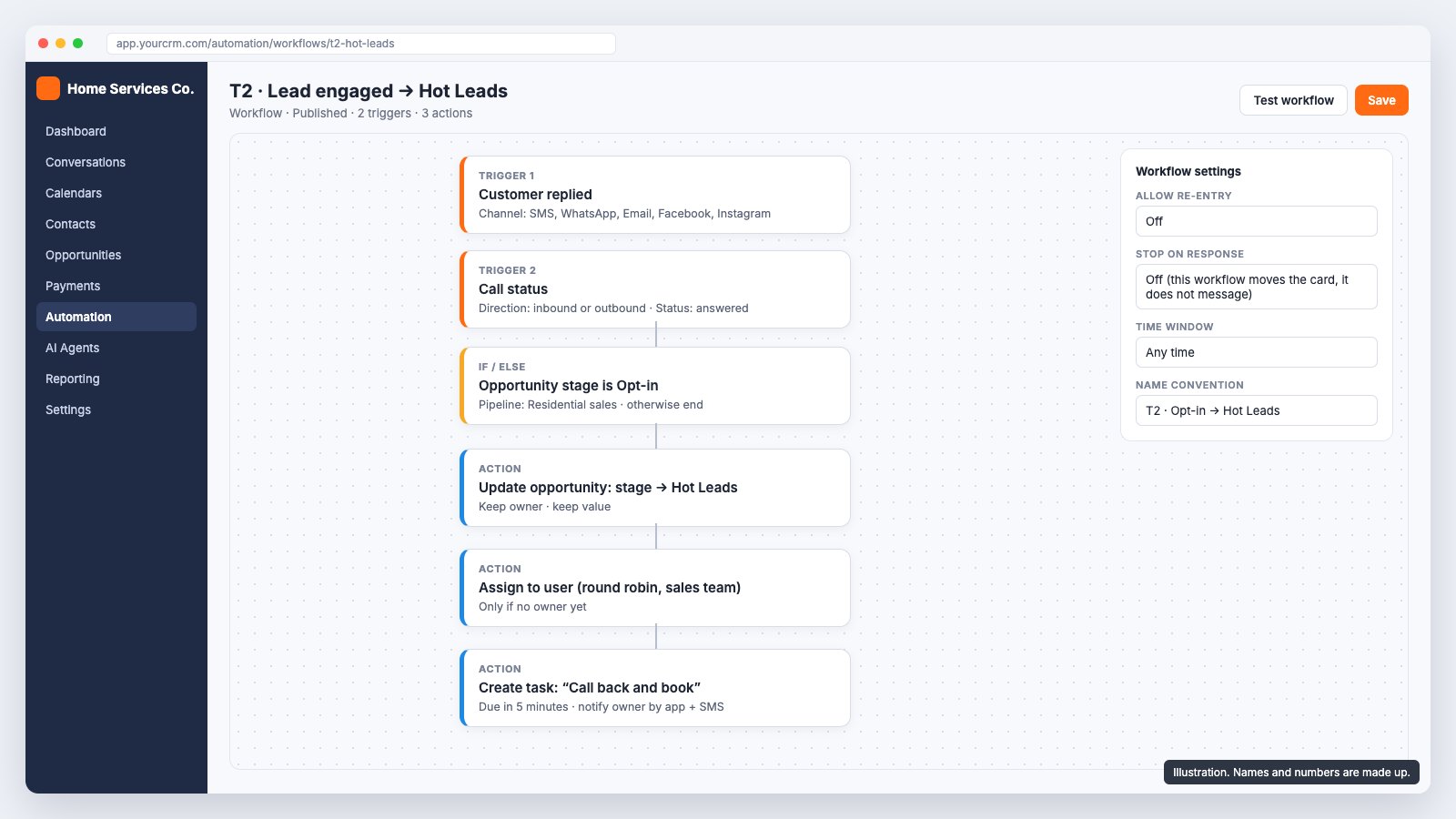
How to build T2, as an example of the pattern:
- Automation > Workflows > Create workflow > Start from scratch. Name it 'T2 · Opt-in to Hot Leads' so the ID matches your list.
- Add trigger 'Customer replied' (all channels). Add a second trigger 'Call status' with status answered.
- Add an If/Else: opportunity stage is Opt-in in the Residential sales pipeline. Only the yes branch continues.
- Action 'Create/update opportunity': move to Hot Leads, keep the owner and value.
- Action 'Assign to user' with round robin across the sales team, only if the card has no owner.
- Action 'Add task': 'Call back and book', due in 5 minutes, with an app and text notification to the owner.
- Publish, then test with a real reply from a test phone and a real answered call.
The other triggers follow the same pattern, with two that need care:
- T4 has no 'appointment time passed' trigger. Start the workflow on 'appointment booked', wait until the appointment start time plus a margin (we used 2 hours), then check the appointment is not cancelled or rescheduled before moving the card. Tell reps that Completed is set by time, so they must move a card back if the job did not happen.
- T6 needs a decision: does a rescheduled appointment go back to Hot Leads or straight to Booked? The client's diagram said Hot Leads; we asked them to confirm, because Booked is usually closer to the truth.
- Keep each workflow to one job. Moving cards and messaging customers in the same workflow is how a customer ends up receiving a 'we miss you' text the day after booking.
Step 5: How do you automate lead follow-up that stops after 5 touches?
Give follow-up a counter. Without one, a quiet lead either gets forgotten after one call or chased forever. With one, every lead gets the same number of attempts, and the ones that never answer move somewhere useful.
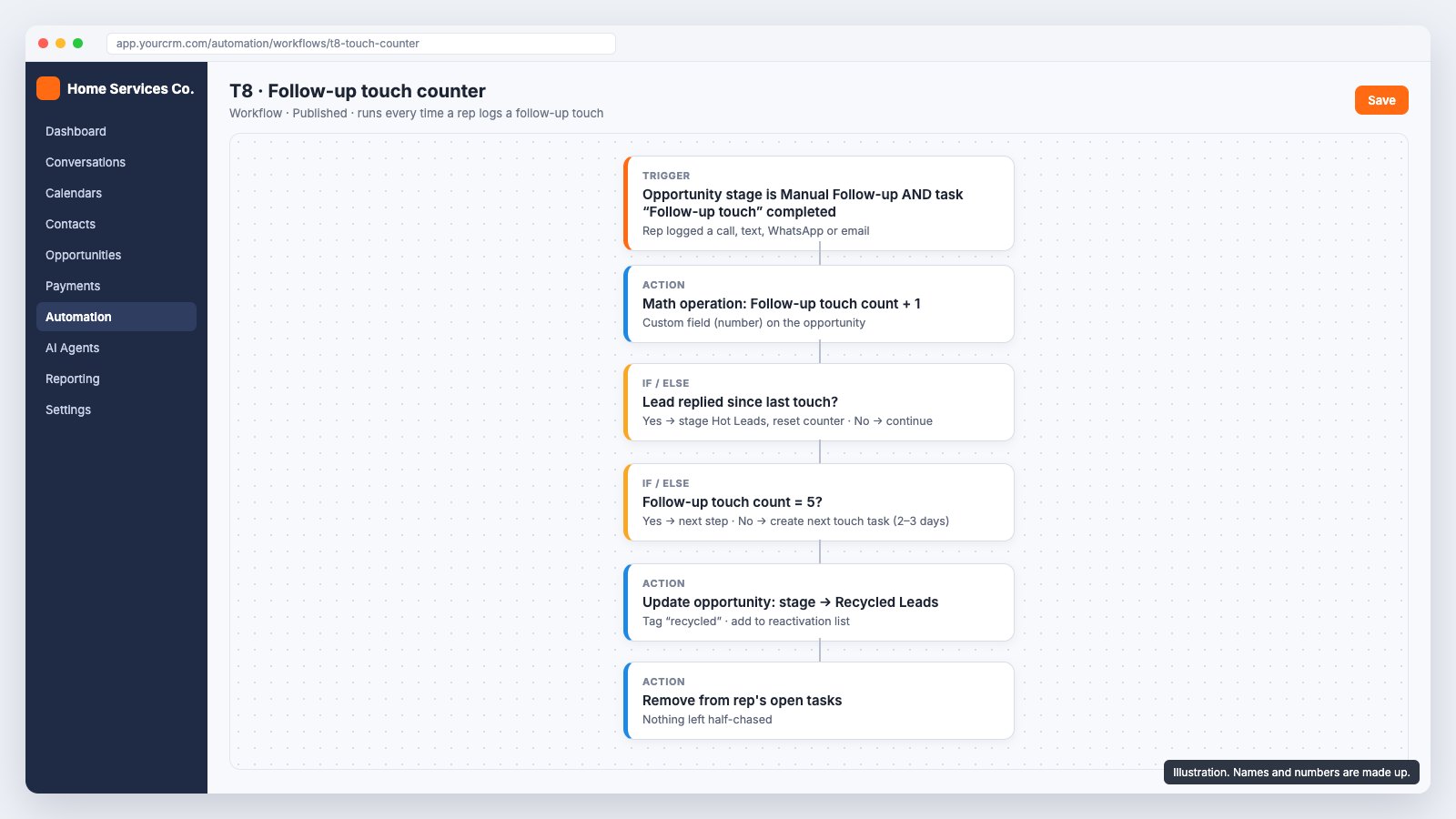
- Create the number field 'Follow-up touch count' (step 2).
- When a rep moves a card to Manual Follow-up (T7), a workflow creates the first 'Follow-up touch' task and resets the count to 0.
- Each time the rep completes a touch task (a logged call, text, WhatsApp or email), a workflow adds 1 to the count with a math operation.
- If the lead replied since the last touch, move the card to Hot Leads and reset the count.
- If the count is under 5, create the next touch task 2 to 3 days out. If it reaches 5, move the card to Recycled Leads, tag it 'recycled' and close any open tasks.
Recycled does not mean lost. Those contacts go into later reactivation campaigns, for example a seasonal duct cleaning offer. Quotes get their own cadence: the client asked for a message on day 1, a call on day 2, a message on day 3, a call on day 5, a follow-up on day 7 and a final one on day 10, then won, lost or nurture.
Step 6: How do you set up call routing and missed call text back?
Ring everyone, fall back fast, text back every missed call and never leave one without an owner. Speed matters more here than anywhere else: a homeowner with a dusty vent or a broken AC usually calls the next company on the list if nobody picks up.
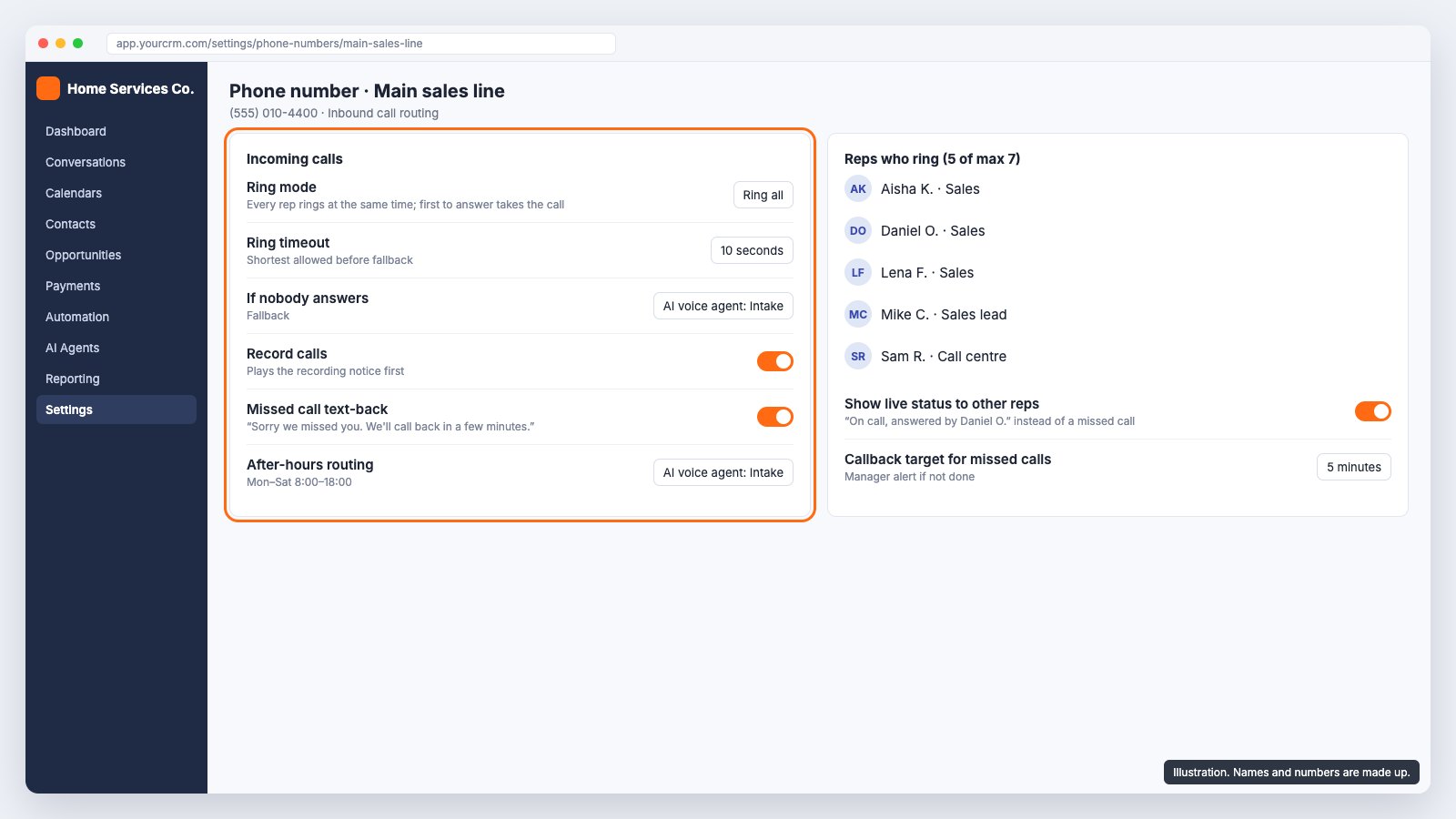
- Buy or port a number in GoHighLevel (a local or toll-free US number; in the UAE the number is issued on request and approval can take a while).
- Set call routing to ring all selected users at the same time. Up to 7 reps can ring on one number.
- Set the ring timeout to 10 seconds, which is the shortest GoHighLevel allows before the fallback.
- Set the fallback to the AI voice agent (step 7) instead of voicemail.
- Turn on call recording, with the recording notice played first.
- Turn on missed call text-back: 'Sorry we missed you, we'll call back in a few minutes.' In the UAE, use WhatsApp for this instead (step 8).
- Add a workflow on 'call status: missed' that creates a callback task due in 5 minutes and alerts a manager if it is still open after that.
One problem the client had in their old setup: while one rep was on a call, everyone else saw it as a missed call until it ended, so two people would call the same customer back. Check how your phone setup shows a call that a colleague has already answered, and test it with three reps logged in at once.
Step 7: How do you set up a GoHighLevel AI voice agent?
Give it one job: take the details a rep needs, promise a fast callback, and create the card. Do not let it quote prices or promise dates. A short, honest agent that hands over well beats a long one that tries to close the sale.
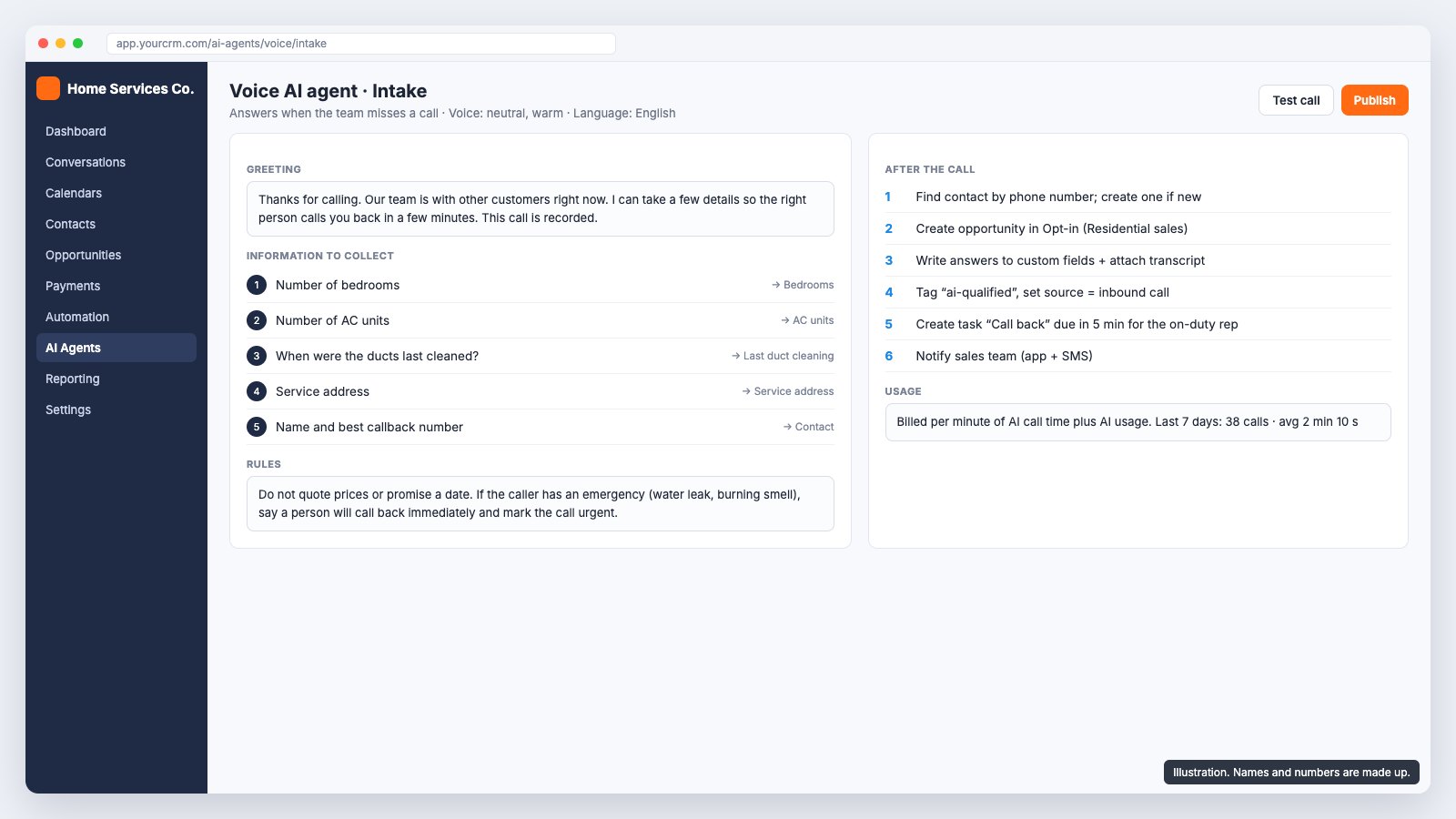
- In AI Agents, create a voice agent. Pick a clear, neutral voice; the per-minute cost depends on the voice you choose.
- Write the greeting: who you are, that the team is busy, that you will take a few details so the right person calls back in a few minutes, and that the call is recorded.
- Add the questions, each mapped to a field: number of bedrooms, number of AC units, when the ducts were last cleaned, the service address, and the caller's name and best callback number.
- Add rules: no prices, no dates, and an emergency path (water leak, burning smell) where it says a person will call back immediately and marks the call urgent.
- Set the after-call actions: find the contact by phone number or create one; create the card in Opt-in; write the answers to the fields and attach the transcript; tag 'ai-qualified'; create a 'Call back' task due in 5 minutes; notify the sales team.
- Test it with real calls from different people, accents and phones, including someone who refuses to give an address and someone who is clearly an existing customer.
Running costs are usage-based: roughly USD 0.06 to 0.22 per minute of AI call time depending on the voice, plus AI usage, on top of normal call minutes. Check the current rates in your account. Also check the recording consent rules for every state or country you take calls from, and say the call is recorded in the greeting.
Step 8: How do you put SMS, email and WhatsApp in one inbox?
Put SMS, email, WhatsApp, Facebook and Instagram messages and call recordings in one thread on the contact. Reps then reply from the same place, and the next rep sees the whole history.
- Email: set up a dedicated sending domain or subdomain in GoHighLevel and add the DNS records it gives you, so mail is not sent from a shared domain.
- US texting: register your brand and campaign for A2P 10DLC before you rely on SMS. Unregistered business texts get filtered or blocked by US carriers.
- UAE: business SMS needs a registered sender name, and new registrations are currently restricted by the operators, so WhatsApp is the main channel there.
- WhatsApp: messages a customer starts are cheaper than ones the business starts, and outside the 24-hour reply window you need approved templates.
Step 9: How do you migrate from Zoho CRM to GoHighLevel?
Clean the Zoho data before you import it. Moving duplicates and half-filled records into a new CRM gives you a new CRM with the old problems.
- Export contacts and deals from Zoho as CSV, with record IDs and owner fields.
- Normalise phone numbers to one international format (+1 or +971 followed by the number). The same customer typed as 050 123 4567 and +971501234567 becomes two contacts otherwise, and the AI agent will not match a returning caller.
- Merge duplicates on phone and email. Decide which record wins when they disagree.
- Map Zoho deal stages to the new pipeline. Old stages that do not fit go to a sensible stage with a tag such as 'imported-from-zoho'.
- Import a sample of 50 records first, check them with the client, then import the rest.
- Spot-check 20 random records with the people who know those customers.
Step 10: Can GoHighLevel handle job dispatch for technicians?
Yes, for a basic dispatch module. When a deal is won, a workflow creates a job record (a custom object, or a card in a separate jobs pipeline) that carries the customer, property, scope, price, salesperson and photos, so nobody types them again. The job then moves through its own statuses.
- Statuses: new, coordinator review, ready to schedule, scheduled, technician assigned, accepted, en route, arrived, in progress, completed, customer confirmation, quality check, ready for invoice, closed. Exceptions: on hold, return visit, additional work, material pending.
- Required on the job: job number, customer, property, service, scope, coordinator, technician, date and time slot, priority and value.
- Evidence rule: a job cannot be closed without before and after photos and the technician's notes.
- Extra work found on site (booked for 4 ducts, found 6) creates a new opportunity for sales instead of being done for free or forgotten.
Keep the first version basic and agree the exact fields during discovery. If dispatch needs route optimisation, parts inventory or offline mobile forms, a dedicated field service app (such as Jobber, Housecall Pro or ServiceTitan) connected to the CRM may serve better than more custom objects.
Step 11: What should a home services CRM dashboard show?
Health first, then exceptions. A dashboard with 40 widgets gets opened once. One with four numbers and two charts gets checked every morning.
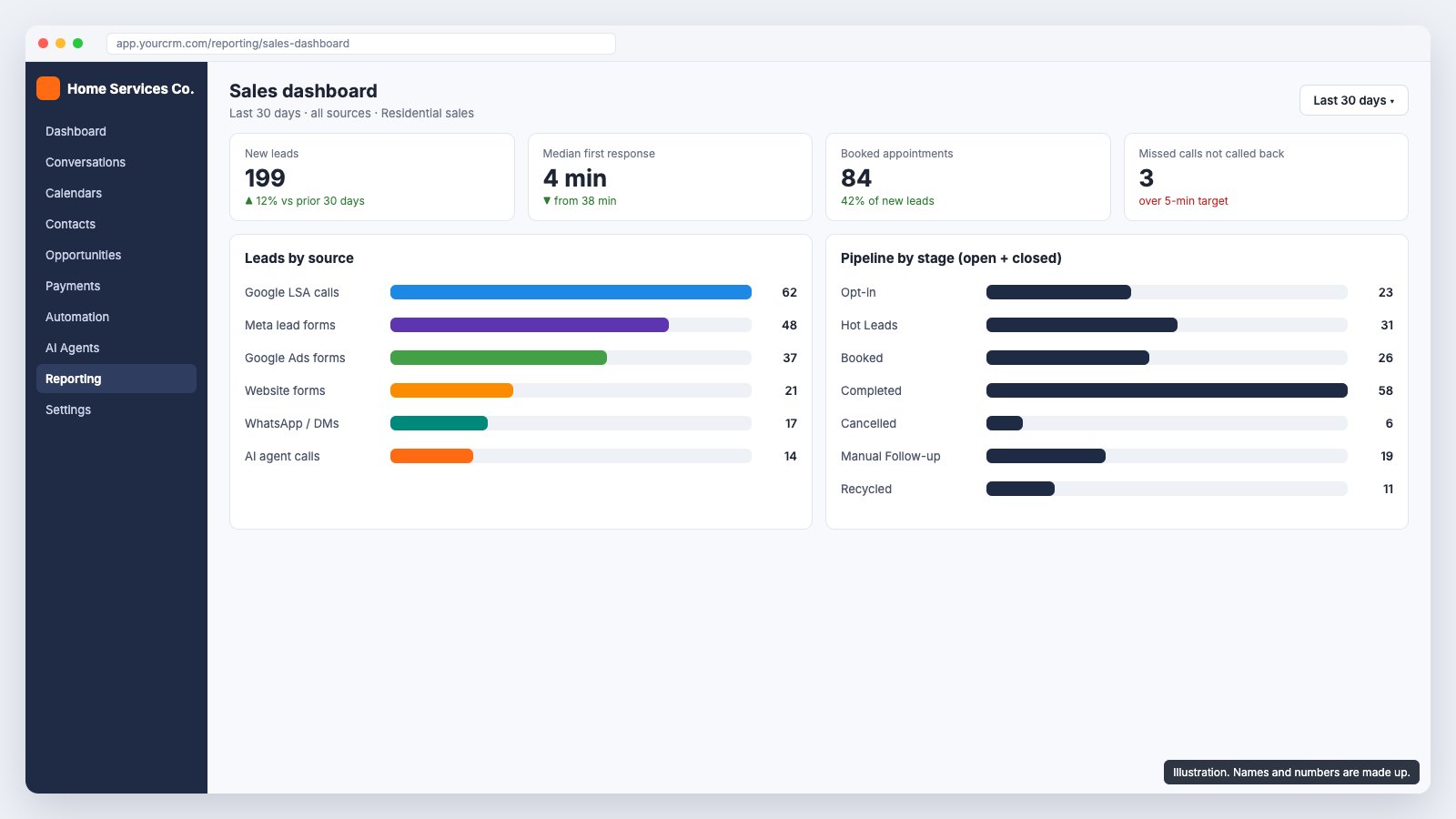
- Leads by source and campaign, so ad spend is judged on booked jobs, not form fills.
- Pipeline by stage, booked and completed appointments.
- Median first response time, against a 5-minute target.
- An exceptions list: leads outside the response target, quotes with no follow-up, missed calls awaiting a callback, overdue jobs, and the value of quotes nobody has touched.
Step 12: How do you test the setup before go-live?
Test every path in the trigger list with real actions, not by dragging cards around. Run each of these and check the card, the fields, the tasks and the notifications:
- Submit each Meta form and each Google Ads form. Card in Opt-in, source filled, owner assigned.
- Reply by text, WhatsApp and email to a new lead. Card moves to Hot Leads.
- Call the main number with three reps logged in; answer on one. Others stop ringing and do not see a missed call.
- Call and let it ring out. The AI agent answers, the card appears with the answers, the callback task is due in 5 minutes.
- Book, cancel and reschedule an appointment. Booked, Cancelled, then back to Hot Leads.
- Let a booked slot pass. Card moves to Completed.
- Log five follow-up touches with no reply. Card moves to Recycled Leads with no open tasks.
- Import 50 Zoho records and call one of those numbers. The agent matches the existing contact.
Then train the team on a normal day's work, not on the menus: where new leads appear, how to log a touch, how to book, what to do when the AI agent creates a card. A short written how-to guide stays useful long after the training call.
After go-live: can GoHighLevel ask for Google reviews after each job?
Yes, and the job record from step 10 is the right place to start it. When a job reaches closed, with the photos and the technician's notes in place, a workflow sends the customer a short text (WhatsApp in the UAE) with a link to your Google review page. Trigger it on the job's closed status, not on the Completed pipeline stage: Completed is set by time (T4), so a visit that fell through on the day could still get a review request.
- Send it once per job, from the business number the customer already knows.
- Skip jobs with a return visit, an open complaint or additional work still pending.
- Point it at the review page for the branch that did the job, if you have more than one listing.
It is not in the hours below. Add it once the dispatch statuses are reliable, because a review request is only as accurate as the status that triggers it.
How long does GoHighLevel setup take and what does it cost?
For this scope we estimated 43 to 48 hours of work, spread over 4 to 5 weeks so the client has time to review each phase and outside approvals can run in the background.
| Area | Hours |
|---|---|
| Discovery and sign-off | 2 |
| CRM setup: users, permissions, pipeline, fields, calendar | 2 |
| Zoho data migration | 3 to 4 |
| Lead capture: Meta, Google Ads, WhatsApp, Facebook and Instagram | 4 |
| Pipeline automations and the 5-touch counter | 9 to 10 |
| Phone system: number, ring-all, timeout, recording | 3 |
| AI voice agent: script, questions, after-call actions, alerts | 6 to 7 |
| Unified inbox and email sending domain | 2 |
| Job dispatch module | 5 to 6 |
| Reporting dashboard | 1 |
| End-to-end testing | 4 to 5 |
| Training and handover | 2 |
| Total | 43 to 48 |
The week-by-week plan: week 1 discovery, users, pipeline, fields and calendar, with the phone number request and WhatsApp connection started; week 2 Zoho data and lead sources; week 3 stage automations, the follow-up sequence and the inbox; week 4 phones, the AI agent, dispatch and the dashboard; week 5 testing, AI tuning, go-live and training.
| Running cost | How it is billed |
|---|---|
| Phone number | Monthly fee per number, billed by GoHighLevel |
| Calls | Per minute of call time |
| AI voice agent | Per minute of AI call time, roughly USD 0.06 to 0.22 depending on the voice, plus AI usage |
| Per business-started conversation, set by Meta and passed through | |
| A small fee per email sent |
Our CRM setups start from AED 2,900 (about USD 790). A build at this scope, with the AI voice agent, migration and dispatch, is quoted as a fixed fee after discovery, with platform usage billed separately by GoHighLevel and Meta.
What usually delays a GoHighLevel rollout?
- Phone number approval, especially outside the US, where numbers can be issued on request.
- Meta business verification and the WhatsApp connection.
- AI voice agent tuning: it takes several rounds of real test calls before it handles different callers and accents well.
- Old CRM data: duplicates, missing fields and phone numbers in five different formats.
- Access and feedback: a missing admin login or a slow review is the most common cause of delay of all.
Which questions should you settle before you build?
These are the open points we put to the client. Each one changes a workflow, so get the answers in writing:
- Ring all reps, or round robin? Does ringing stop for everyone once one rep answers?
- Should the 10-second timeout change after hours, and should the AI agent answer out of hours or when nobody is logged in?
- Which existing numbers forward to the new GoHighLevel number, and do Local Services Ads calls go there?
- Are recordings and transcripts saved to the card, and what consent wording is needed?
- Does an AI-handled call match an existing contact by phone, or always create a new card?
- Does an AI-qualified caller stay in Opt-in until a rep calls back, or move straight to Hot Leads?
- When a cancelled appointment is rescheduled, does it go to Booked or back to Hot Leads?
- What is the callback target, and how are reps told: app, text or a board alert?
- Which reps receive calls, and in which hours?
- Who pays for AI minutes, call minutes and messaging, and is there a monthly cap?
Which house rules keep a CRM like this honest?
Automation only covers what is in the system. The client wrote their own rules for staff, and they are worth copying:
- No lead without an owner, and no open deal without a next action and a date.
- No discount outside a person's approval limit.
- No won deal without a job, and no job without a coordinator and a technician.
- No completed job without photos and a report.
- No customer details kept only in WhatsApp or on a personal phone.
- If it is not in the CRM, it did not happen.
Put a review a month after launch on the calendar: which steps people are skipping, which statuses are wrong, which automations failed. Fix those, then lock the process.
Questions people ask
Is GoHighLevel good for home services businesses like HVAC and cleaning?
Yes, if you want sales, calls, messaging, booking and follow-up in one account and you are willing to design the pipeline and automations properly. It is weaker as a full field service tool, so plan a basic dispatch module or connect a dedicated app if you need inventory or route planning.
How long does it take to set up GoHighLevel for a home services business?
For a setup with a 7-stage pipeline, every lead source, ring-all calls, an AI voice agent, a data migration and basic dispatch, plan on 4 to 5 weeks and 43 to 48 hours of work. Phone number approval, Meta verification and slow access are what stretch it.
How do you set up missed call text back in GoHighLevel?
Turn on missed call text-back in the phone number settings, so a caller who is not answered gets a short text saying you will call back. Then add a workflow on 'call status: missed' that creates a callback task due in 5 minutes for the owner. In the US, register for A2P 10DLC first or carriers may filter the texts; in the UAE, send the message on WhatsApp instead.
Can GoHighLevel answer missed calls with AI?
Yes. Set the number to ring your reps and fall back to a voice AI agent after the ring timeout, which can be as short as 10 seconds. The agent can ask qualifying questions, write the answers to fields, create the opportunity and alert the team. It is billed per minute of AI call time.
Can I move from Zoho CRM to GoHighLevel without losing data?
Yes. Export contacts and deals, normalise phone numbers, merge duplicates, map old deal stages to the new pipeline, import a sample first and spot-check it with the team before importing the rest.
Do I need A2P 10DLC registration to text customers from GoHighLevel?
For business texting to US numbers on a standard 10-digit number, yes. Register your brand and campaign before you rely on missed-call text-back or SMS follow-up, or carriers may filter your messages.
Can GoHighLevel connect to Google Business Profile messages?
No. Google shut down Business Profile chat in July 2024. Calls from your Business Profile listing still reach your phone number, so route them through the same ring-all and AI agent setup.
Does GoHighLevel move cards between pipeline stages automatically?
Yes, with workflows. Triggers such as customer replied, call status, appointment booked or cancelled, and form submitted can move an opportunity to another stage. Moves based on time, such as marking an appointment completed after it passes, need a wait step in the workflow.
Built by GoDesign FZE, who build WhatsApp and CRM automation for UAE businesses.
Get in touch
Want someone to just do this part?
The tool is free and stays free. If you would rather hand the work over, tell us what you are dealing with and you get a straight answer on scope, cost and timeline.
- You own everythingRepository, hosting and domain credentials sit in your name from day one, not handed over at the end.
- A written timelineMilestone dates are agreed in writing before work starts, so you always know what ships next.
- One business dayEvery enquiry gets a reply from the person who would scope the work, not a sales sequence.
Media City, Dubai, UAE · DHA Phase 2, Islamabad, Pakistan
Would rather type than fill in a form?
Message on WhatsApp